

 Are you looking for ultimate control over your businesses web presence with Magento and want to use eSellerPro for all the back-office functions?
A fully customisable web-connector is now available for Magento community & Enterprise versions using eSellerPro for all back office tasks.
The “connector” acts a remote control for your Magento website from eSellerPro, products are created and updated, stock & pricing is controlled by the channel profile, orders are delivered back to eSellerPro and customers are kept informed as orders are updated back on your Magento site.
“The goal of the connector is that you just hit one button in eSellerPro to create or update products in your Magento store, so that it’s just as easy to list on to your website, as it is eBay”
As of September 2013, the active Magento connectors have delivered over £6,000,000 worth of Magento orders to eSellerPro. The largest known Magento order to be delivered was worth over £11,000 and contained more than 500 line items and the largest inventory processed in one go was over 150,000 product lines. One user of the connector has delivered over 8270 orders from their Magento site to eSellerPro.
So What’s Supported?
Simple and configurable products are supported (that’s variations if you’ve not heard of that term before) and you can manage all inventory data from within eSellerPro, that’s images, descriptions, attributes, categories and so on… and then mapped to the right fields within Magento. New products take 2-3 seconds to be created, so the connector is fast and if you add in new customfields in eSellerPro, then these are automatically created in your Magento site and populated accordingly.
A full side-side comparison is available further down this page.
Almost all extensions are supported from SagePay to image galleries, if you have featured product extensions that allow you to show products on the homepage or in other featured areas, these can be controlled easily in eSellerPro using tick box options to turn products on or off in these sections. And if you need tiered or grouped pricing, then this is also supported too.
Orders are collected every few minutes and are brought down from your Magento site and sent to eSellerPro with every single piece of information that your team needs to be able to process orders quickly & efficiently, just like any of order that comes into your eSellerPro account. Then once your orders have been marked as despatched, Magento is updated with the tracking information, making it a seamless experience for your customers.
Because the integration sits between eSellerPro and Magento, if the data is available, anything is possible.
You can find out more about the story behind the eSellerPro to Magento connector here and also how you can manage related, cross-sell and up-sell products from within eSellerPro or automatically here.
Video Overview
Press play on the video below to be taken through a high level overview of the Magento to eSellerPro connector.
You can watch this video in HD on YouTube and the side deck is on slideshare.net.
Key Features:
- Ultra fast loader for creating new & updating existing inventory
- Automatic stock & price updates
- New orders delivered into eSellerPro
- Orders updated in Magento when marked as shipped or cancelled in eSellerPro
- Support for multiple Magento stores
- Configurable products supported
- Attributes dynamically created on-the-fly
- Automatic re-indexing or assistance setting up a indexing schedule
- SEO friendly features included
Side by Side Comparison
Below is a side by side comparison of the Connector v’s the known features of eSellerPro ‘s own integration as of August 2013.
Highlevel OverviewBelow is a high-level overview of the two integrations available between eSellerPro & Magento. On face-value they’re similar however as we delve deeper into each section the Connector is highly flexible and is customised to each Magento integration with the ultimate goal of your team pressing one button in eSellerPro to create & update products within minutes. |
|||
| Magento / eSellerPro Function | eSellerPro’s Integration | The Connector | Notes |
| Create “Simple” Products |  |
 |
eSellerPro’s integration only supports basic inventory creation is currently only available on Magento version 1.5.1. The Connector supports Magento versions as old as 1.3 right up to version 1.7.0.2. |
| Create “Configurable” Products | |
|
eSellerPro’s integration only supports basic inventory creation is currently only available on Magento version 1.5.1. The Connector supports configurable products right up to version 1.7.0.2. |
| Product Loading Speed | Slow | Under 3 seconds |
The largest site using the Connector has over 150,000 products, these were loaded in a day without killing their web-server or database, allowing the site to remain transactional through the entire update process. |
| Stock Control | |
|
See the notes below |
| Pricing Updates | |
|
See the notes below |
| Order Collection & Delivery into eSellerPro | |
|
See the notes below |
| Order Status Updates back to Magento | |
|
See the notes below |
| Magento Multi-Site support |  |
|
The Connector has native support for multiple Magento sites from a single installation, proven to work with configurable & simple product types. |
Order CollectionThe connectors have delivered over £6,000,000 in Magento orders to eSellerPro. The largest known Magento order to be delivered by the “Connector” was worth over £11,000 and contained more than 500 line items. |
|||
| Magento / eSellerPro Function | eSellerPro’s Integration | The Connector | Notes |
| Can collect Magento orders & delivery back into eSellerPro | |
|
The Connector supports multiple Magento sites, eSellerPro’s implementation does not. |
| Can collect orders from any order processing status or multiple statues | |
|
Not all extensions will deliver a paid order into the “processing” status, the Connector can be configured to bring in orders from any status |
| Can import previously shipped orders | |
|
This is super handy when bringing an existing site to eSellerPro, previous orders can be downloaded into your eSellerPro account either by order number ranges or by a date range. |
| Frequency of order collection | Unknown | Every 5 minutes |
If you have a especially busy period at known time intervals (say around the warehouse despatch cut-off time) then the connector can be set to run more quickly at times of need. Default: 5 minutes. |
| Updates sent orders to eSellerPro with a new order Status | |
|
Transparency is key when working with external order sources. You’ll be able to see exactly which orders have and have not been sent yet from your Magento administration panel with the Connector |
| Adds notes to each order to track the history of the integrations progress with an order | |
|
Everything the connector does with an order is logged in the order comments section. Want to see when an order was sent to eSellerPro or updated? Easy it’s in the order comments section. |
Payment GatewaysThe “Connector” already supports the common payment gateways. With each order the “Connector” provides as much information as possible about each transaction into the order back in eSellerPro. You’ll be able to see the 3D Secure & AVS notices, eligibility for seller protection, the payment email address, the card type used & method of sale. Basically everything you need to know back in eSellerPro to be able to manage almost all day-to-day customer service & despatch processes. |
|||
| Magento / eSellerPro Function | eSellerPro’s Integration | The Connector | Notes |
| PayPal Express | |
|
The connector provides key payment information for customer services & despatch with each order |
| PayPal Website Payments Standard | |
|
This was successfully integrated in January 2013 |
| PayPal Website Payments Pro | Unknown | |
This was successfully integrated in January 2013 |
| PayPal Website Payments Pro Hosted | Unknown | |
This was successfully integrated in March 2013 |
| PayPal Website Payments Pro Payflow Edition | Unknown | |
This was successfully integrated in June 2013 |
| SagePay FORM | Unknown | |
Special note on SagePay Both the free ebizmarts extension and the paid for ebizmarts extensions are supported by the Connector. The paid-for extension allows the processing of refunds. |
| SagePay DIRECT | Unknown | |
This was successfully integrated in March 2013 |
| SagePay SERVER | Unknown | |
This was successfully integrated in March 2013 |
| WorldPay | Unknown | |
This was successfully integrated in July 2013 |
| MoneyBookers | Unknown | |
Not currently supported by the “Connector” but can be added within 1 working day. |
| Direct Credit Cards | Unknown | |
|
| Check / Money Order | Unknown | |
|
| Bank Transfer | Unknown | |
|
| Cash on Delivery | Unknown | |
|
| Purchase Order | |
|
Not currently supported by the “Connector” but can be added within 1 working day. |
| Ogone, ePay, Paybox etc… | |
|
Any payment method is supported by the “Connector”, if your prefered payment gateway is not listed here, its highly likely that it can be added to your integration. |
| Amazon Payments | |
|
|
Inventory Creation & UpdatingThe goal of the Connector is for you to hit the globe button in eSellerPro and it does the rest, no matter how much extra work is needed to get the product data to the highest level possible. |
|||
| Magento / eSellerPro Function | eSellerPro’s Integration | The Connector | Notes |
| General Product Processes | |||
| Can create simple products | |
|
eSellerPro’s integration only supports basic inventory creation is currently only available on Magento version 1.5.1. The Connector supports Magento versions as old as 1.3 right up to version 1.7.0.2. |
| Can create configurable products | |
|
eSellerPro’s integration only supports basic inventory creation is currently only available on Magento version 1.5.1. The Connector supports configurable products right up to version 1.7.0.2. |
| Use any field for the product title | |
|
The “Connector” can work from the website title, alternative website title, eBay listing title, inventory title or even a custom field and even has a fall-back system, so that if a title has been missed out, your product will still load into Magento and follow the rules defined in the integration specific to your requirements |
| Pre / post fix the product title | |
|
If you need a part number or any field for that matter adding at the beginning, end or or both sides of the title, this can be accomplished using the Connector |
| Supports all 5 product descriptions | |
|
This will be ready as soon as it’s released by eSellerPro in the Connector |
| HTML Tag stripping for product descriptions | |
|
All HTML tags can be stripped from the product description, also the Connector has the ability to allow specific tags through, such as <strong> or <em> which means you can retain a great looking site even if your descriptions are not 100% perfect. |
| Weights | Unknown | |
Weights are loaded in to Magento from eSellerPro. These also can be converted to grams or kilograms for compatibility with Magento shipping Extensions. |
| New from & to dates | |
|
These can be added by default in the Connector. An excellent feature for theme specific functions so that new products can be showcased easily. |
| Product URLs | |||
| Dynamically make URL Keys | |
|
The eSellerPro integration relies on Magento’s inbuilt functions to make the product URL key. With the Connector can do whatever you want it to do. For example the the product URL keys could come from a custom field, handy when migrating to Magento from another platform. |
| Custom URL structure | |
|
If you need granular control over the urls that Magento uses, this can be be configured in the Connector. |
| Use an existing product URL key | |
|
If you’re migrating from another website, keeping your existing product URL structure is very important so that you don’t loose search rankings for popular products. With the connector you can use any field in eSellerPro to add an existing URL key and you’ll be supported during the migration so that small things such as these that have a huge impact on your sites sucess are not overlooked. |
| Product Pricing | |||
| Accept updates from the Channel Profile | |
|
Control the pricing via the Channel Profile |
| Sale / Special Price | Unknown | |
With the Connector any field can be used for special/sale pricing |
| Put products on & off sale | Unknown | |
As products are put on & off sale, the Connector accounts for this and also changes the dates too. |
| MRSP Supported | |
|
|
| Any custom pricing such as RRP values | |
|
With the Connector any field can be used for pricing |
| Tiered Pricing | |
|
Tiered pricing is used for discounts for X quantity and is only available in the Connector |
| Group Pricing | |
|
The largest user of the Magento Group Pricing feature has over 15 pricing levels. In it’s simplest form this feature allows you to have both a retail site with one set of pricing and a trade/whole site with different pricing. Each pricing level is assigned to a customer group and uses native functionality in Magento. |
| Tax Classes | |
|
The connector supports both the default tax classes and any custom tax classes you created. These are linked back to he VAT levels you set in eSellerPro. |
| Images | |||
| Native Magento image support | Unknown | |
The connector loads your product images from eSellerPro to your Magento site locally. This means that you’re able to use your own CDN network and no special extensions are required for image support. |
| Image labels | |
|
Adding image labels is an excellent idea, not only for SEO purposes, but also if you’re using a lightbox as many of the popular lightboxes will show the image label with the product image. |
| Image renaming | |
|
The connector not only has native image support but we can do some really cool things with images when they’re being imported into Magento with your products. Renaming images from a meaningless name of “product1.jpg” to “part-number-123456-this-is-a-product-title.jpg” not only makes the image name tasty for search engines, sharing on social sites like Pinterest ,it’s a lot more intuative for customers too. |
| Main, thumb, small image & media gallery support | Unknown | |
As the images are loaded natively to Magento, this means that any extension, image gallery or lightbox is compatible with the “Connector”. |
| Can exclude Nth image | |
|
If you have a specific image that you are using just for eBay or Amazon, this image can be blocked as part of the inventory loading process. |
| Control over image order | Unknown | |
Changing the ordering of images on Magento is easy, you change the order of them in eSellerPro (as your eSellerPro account is the inventory master) and any updates you send are reflected back in Magento. |
| Meta Data | |||
| Meta title | |
|
Via the Connector you’re able to use the meta title field from the website tab in eSellerPro or any field you desire. |
| Pre & Post fixing the Meta Title | |
|
The meta title is the most important metafield of them all, for this reason you’re able to prefix or postfix meta titles with any other attribute you desire automatically using the Connector. |
| Meta Description | |
|
Note: Magento makes a meta description automatically if it’s left blank. |
| Auto generate Meta Description | |
|
The Connector goes one stage further and can automatically make a meta description using your description (or any description of your choice) and also load in part numbers, stock numbers as required for a keyword rich description. |
| Meta Keywords | |
|
Note: Magento makes a meta keywords automatically if it’s left blank. |
| Auto generate Meta Keywords | |
|
Using the product description, the connector works out the most commonly used words, strips out the obvious words like “the”, “or”, “and” etc.. and creates a meta keywords that are highly specific to each product automatically. |
| Design | |||
| Control page layout from eSellerPro | |
|
With the Connector you’re able to control the page layout settings down either for all your products as a default or even down to per-product level. |
| Control product display options from eSellerPro | |
|
The same options as above. |
| Stock Control | |||
| Keep Stock updated in Magento | |
|
Keep your product stock levels in-sync with eSellerPro |
| Change stock status automatically | |
|
The connector uses Magento’s own indexing processes for stock control to ensure compatibility. |
| Override Magento stock control options at a per-product level | |
|
The Connector has the ability to override Magento inventory options such as allowing backorders on a per-product basis. |
Full Feature List
Because each connector is tailored to your exact requirements this list is not exhaustive. Custom requirements can be accounted for in your connector between eSellerPro & your Magento store(s).
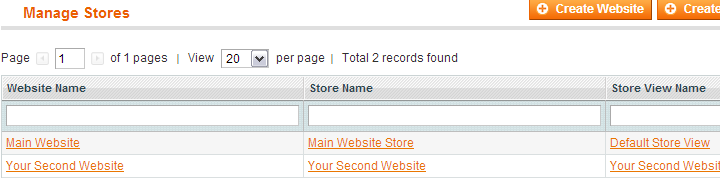
Multi-Stores
Multiple stores & views are supported in the connector and if you have multiple installations, those are supported too.
- Multiple stores & views
- More than the eSellerPro cap of 10 web-stores supported
- Multiple languages support
- Auto translate available for descriptions
(requires a $20 subscription to Google for 1M characters)
Product Data
You have full control over the way product data is shown & displayed can be done in both eSellerPro and in Magento, which ever is more suitable. Logic testing & alternations can be performed by the connector if required.
- Uses existing functionality in eSellerPro & Magento
- Customised options can be added
- SEO Friendly URL’s created dynamically
- Product tags support
- Media gallery support
- SEO friendly names for image tags
- Meta descriptions and meta keywords automatically created
- Images can be dynamically renamed
- Related items supported
- Cross-sell & Upsell items supported
- Google Base & all other custom values supported
Attributes & Custom Fields
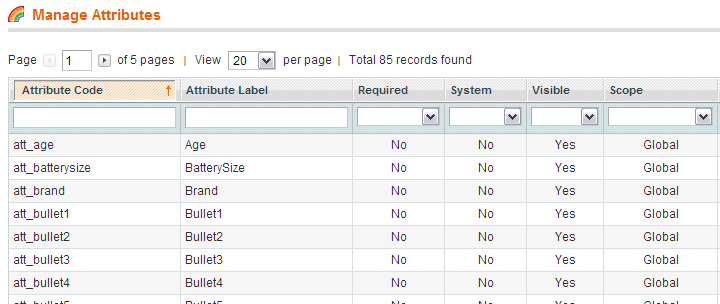
In Magento custom fields are known as “Attributes” and these can be added into attribute sets in Magento to be hidden or shown as desired.
Attributes can also be used to show or hide sections dynamically depending on the theme being used. For example video content on a product page.
- Custom fields that don’t yet exist as attributes in Magento can be automatically created
- Custom fields with sensitive data in (such as pricing) can be blocked from being loaded to Magento
- Full control over which attributes are shown in which attribute sets
Product Types
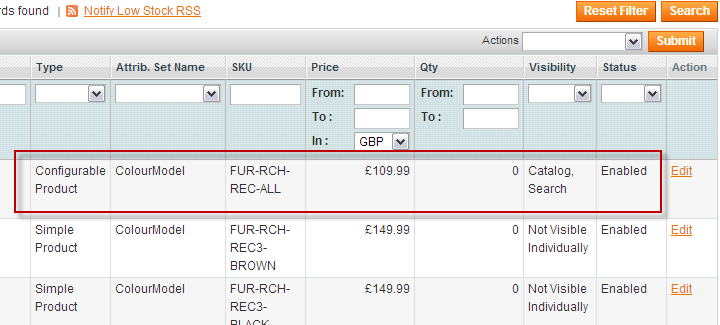
The following product types are supported in the Magento connector.
- Simple
- Configurable
(These are used for variation & multi variations products)
“Bundles” & “Grouped” products are not supported as you can already create and manage these in eSellerPro. For configurable products, these can be of a maximum of five different sets of configurable options (can do more than 5 if required).
Product Pricing
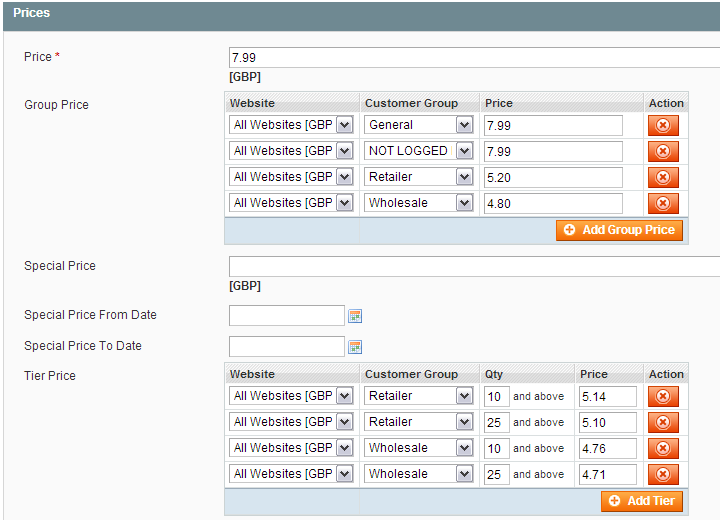
Two prices are available by default from eSellerPro, the item sell price and then sale price. However through the use custom fields, absolute control over product pricing can be obtained to allow group and tiered pricing options in Magento.
- Price & sale price support
- Pricing can be worked out by the Channel Profile or by the connector, using any field that is available, including custom fields for ultimate control over pricing
- Tiered pricing support (for quantity or price breaks)
- Group pricing support (for customer groups, such as trade or wholesale)
Stock & Price Updates
- Stock & price updates processed automatically
- Pre-processing rules for stock levels, store visibility & prices can be applied
With the stock & price updates, there are now two ways in which these can be updated, a quick way that works with stores with less than 70,00 products and a custom method for handling stores with +70,000 products.
Categories
Categories can be created on-the-fly allowing you to control the categorisation of your products back in eSellerPro using product categories in the maintenance section.
- Use existing functionality in eSellerPro
(this means you keep all process in eSellerPro allowing you to easily update your products) - Categories created automatically
- Products entered into all category levels (the default) or just in to the last category in the category path.
Order Collection & Updates
Orders are collected at timed intervals and delivered into your eSellerPro account, so that your website orders are processed just like all your other orders.
- Orders collected at timed intervals (normally every 15 minutes)
- Pre-processing rules can be applied order values to make matching up & processing orders easier in eSellerPro
- Can collect orders from Magento stores without full inventory & stock integration
- When you mark an order as despatched in eSellerPro, it’s updated in Magento
- Courier information included in order shipment if available
- Extra payment information is included in the order details in eSellerPro
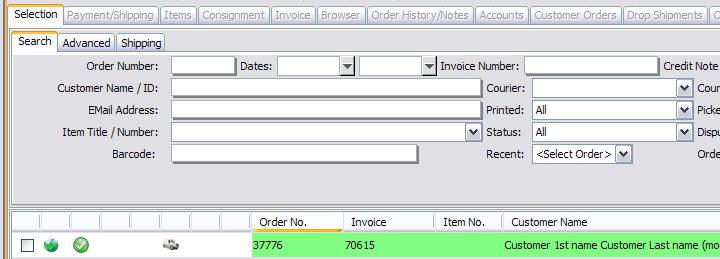
Fully Logged
All software has bugs or “unexpected features” as I like to call them, its how you handle these events which is absolutely key.
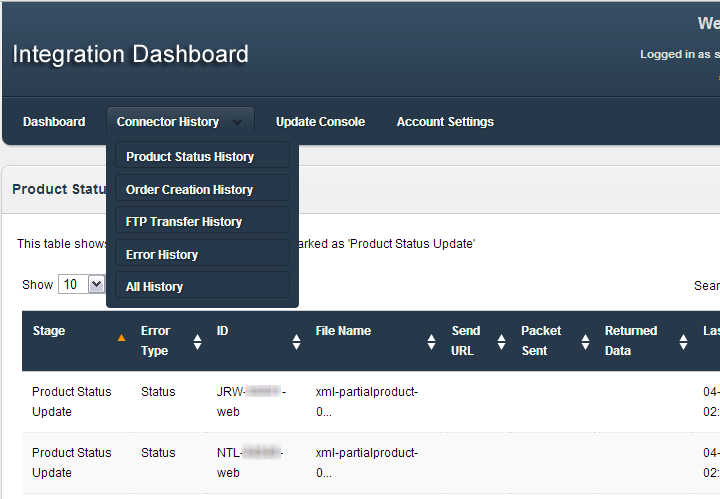
The connector between Magento & eSellerPro was built with error trapping and logging functions from the start. Every update is logged to a dashboard that can be used to keep track of all updates made by the connector and critical errors such as order collection failures are emailed directly to named contacts, so that not only myself are aware of an issue, you are too. It’s going to happen and transparency is paramount.
Compatible Magento Versions
The connector has been tested with community versions 1.7.0.2 and 1.5.1, however it is also compatible with the following Magento Community & Enterprise versions:
- 1.7, 1.6, 1.5, 1.4, 1.3
Would You Like to Know More?
The connector can be customised to your businesses requirements & pricing depends upon the level of customisation required. Use the contact form below to ask any questions you may have and I’ll be in touch shortly.
[contact-form-7 id=”7896″ title=”Magento Contact Form”]

Trackbacks & Pingbacks
[…] Magento to eSellerPro Integration […]
[…] Magento to eSellerPro Integration […]
[…] Magento to eSellerPro Integration […]
[…] Feedback WidgetTerapeak Keyword Value Summary ScripteSellerPro Website & Bespoke IntegrationsMagento to eSellerPro IntegrationeSellerPro to OpenCart IntegrationeSellerPro to OpenCart IntegrationeSellerPro Website & […]
Leave a Reply
Want to join the discussion?Feel free to contribute!