

Reverse Engineering an eBay Template from an eBay Listing Part 1
 Following on from the article series around eBay listing templates I recently covered in Part 1 and Part 2. In this article, I reverse engineer an eBay listing template from an eBay listing and show you the parts that make up an eBay listing template.
This is again going to be part of a two-part series and in the second part, I’ll be showing you the template that makes up the eBay listing, which is probably a lot like the one used to create the eBay listing we’re dissecting today in this article.
So let’s dive in!
Introduction to Keywords
Wait……………. Before we dive into this, I need to introduce you to something called “Keywords”. Keywords come in many names, macros, variables, shortcuts, custom fields are a few common names, they all mean that they are a placeholder for data to be entered into.
For example, if we had a product whose colour is ‘Black’ and its data field is called ‘Colour’ then it’s quite possible that when we see a listing extract in the image below, that the actual template on the left is using such a keyword, so that when the item is listed, it becomes like the right-hand side.
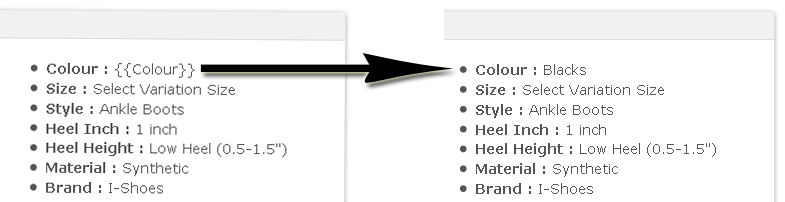
This is how large sellers on eBay are able to create consistent eBay listings, they’re not making every single listing by hand they’re using tools that are advanced and allow them to focus on each core element of the listing separately.
Note: These ‘Advanced Tools’. You’ll be seeing a few of these over the next few weeks and what they can do.
Reverse Engineering an eBay Listing Template
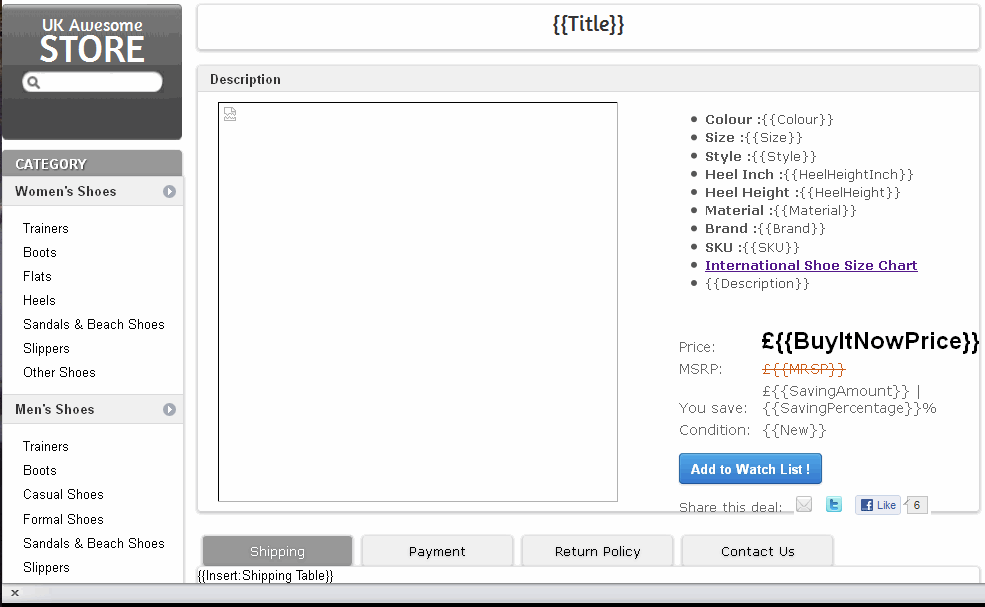
What I am now about to do could be explained in a couple of thousand written words, but I can do better than that I’m going to show you using video and take you through stage by stage to reverse engineer the template that site beneath an eBay listing.
Summary
I remember the first time I was introduced to keywords (or Macros as they were called in MarketWorks), they were quite odd I have to admit and it took me a while to get-my-head around them.
eBay Templates enable businesses that use 3rd party tools to sell on eBay to crucially separate their product data from their eBay templates.
I eluded to the fact that some software tools allow you to template the templates. At eSellerPro, the boundaries of what can be done with templating was pushed to a level I didn’t think was possible (or even needed) and I’ve been known to create some complex structures of product templating & data that have allowed exceptionally slick data input methods for businesses in the background and what the customer sees as in the eBay listing, looks superb.
This article was designed to introduce you to what an eBay template could look like in a back-end tool, what I didn’t cover was the data that powers the listing in the background and that’s in part 2 of this series.





Hello All.I want to create my own template using the listing variable for adding to ebay store.How can I create the categories menu in ebay template using the ebay variables.? please help in advance.
Hi Pardeep,
The eBay shop keywords don’t work in eBay listings. If you would like categories to show, see either the eBay listing frame or this widget.
Matt
Hi Matt;
thanks for your tips
I need to get my store categories but having a hard time . is there a url for ebay api (or a php) to get this info. thanks so much. I found this in ebay site but can not get it :
110040510018
14966
*****
Hi Jeff,
WordPress has chopped out the latter part of your comment, so not sure what you entered.
eBay do have an API, infact they have multiple ones, see here https://go.developer.ebay.com/
Matt
Hi, Matt, there is something very hard to understandd for me here. Is there any option that you can provide me with direct contact to you so i can ask a few questions about this article ? It is hard to me explain here. Can you drop me email please with any chat client where you can be found ? My e-mail is [removed]
If you agree to help me this will answer a question to me equal to how the universe was made :D Cheers, hope to hear from you, Enchev, Bulgaria
Howdy Enchev,
I’m unavailable for the next few months for any one-to-one work, however the forums here http://lastdropofink.co.uk/forum/ are always open.
Kind regards,
Matt
Just a quick question,
where do the tags get the info from ?
Howdy Sid,
They’re pseudo tags, as in they’re made up for the example, but many 3rd party tools support keywords such as these to allow you to do what I detailed in the video, have a look in the solutions directory here http://lastdropofink.co.uk/category/solutions-directory/ebay-selling/
Matt
Thank you for this article..
but I have a question how can you copy this template in your own Ebay Listing…
Ebay didn’t accept javascript anymore?!!
I was looking for a solution to my Template who jump sometimes in Ebay Header when the page startet.
Howdy Ray,
Thank you for the comment.
To use the template in the video you would need to edit the source of a live listing and replace it with your own details and then paste to your own HTML to editor for use.
eBay does allow JavaScript, it always has, if you are getting error notices then look at the functions you are using and locate the one that is causing it to be rejected by eBay (just cutting out parts normally works well to locate the issue.
Matt
@arthurhale you http://t.co/DLwm8pko “Data is the Life Blood of an eCommerce Business” http://t.co/yrQ7o3fb P1 & P2 http://t.co/pCCbAh1O
Thanks Matt, always good to remember the power of firebug, maybe a few copyright issues here?
The dynamic category menus are still the elusive thing to nail down ;-)
Howdy Jason,
Firebug is absolutely brilliant. If you’re reading this and want to use FireBug, it can be found here as a free addon to the FireFox web browser.
With regards to the category menu, polling the eBay API for your store categories is really straight forwards see http://developer.ebay.com/DevZone/xml/docs/Reference/ebay/GetStore.html and then using something like flash or AJAX to include them (bit naughty as you’re not allowed includes, but its very wide spread *coff* Frooition *coff*)
Matt
Cheers Matt, Safari also has a built in module similar to firebug in developer tools “inspect Element” works in a very similar way.
API and flash is a bit beyond me, but worth a try out.
Yea there is a similar tool in Chrome too, but FireBug is far simpler to use.
Flash might be overkill, if you can include using Javascript, its likely to be #1 cheaper & #2 compatible with more browsers.
Matt