
Q&A: How Can I Use All the Search Keywords for an Amazon Listing?
This is the second of a series of articles where I’m answering several questions that have come in via email in the past few days, that I feel that you’d gain value from hearing the answer too.
Maximising the Search Keywords on Amazon
Today’s question is in relation to using the extra keywords when creating or updating products on Amazon.
If you didn’t know about these, then dig in they can be leveraged to help drive extra traffic to your Amazon product listings and as we find out they complement the product title.
Here’s the question:
Hi Matt,
Amazon have 5 extra cells in excel that we can enter keywords into and they allow 50 characters per cell.
How do I use all these all to maximum benefit and can I put in more than one keyword into the cell, if so how?
Regards,
Loïc.
So What Are Amazon Search Keywords?
 So before dig in we need to make sure that we’re all on the same sheet, literally the same import sheet.
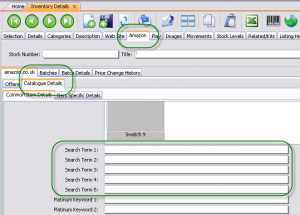
When creating or updating products on Amazon you can do this using an import sheet that Amazon provides. These import sheets vary from category to category and if you are using a 3rd party tool, then look for 5 boxes called “keywords” or “search terms”.
I’ve included a screen shot from an eSellerPro account to the right and these are found on the “Catalogue Details” tab and also they should not be confused with “Platinum Keywords” (Platinum Keywords are used for the Amazon Webstore and their categorisation)
There are a collection of inventory loading templates, the templates you need to use to create new products on Amazon with can be found here and they are at the bottom of the page (not the first ones).
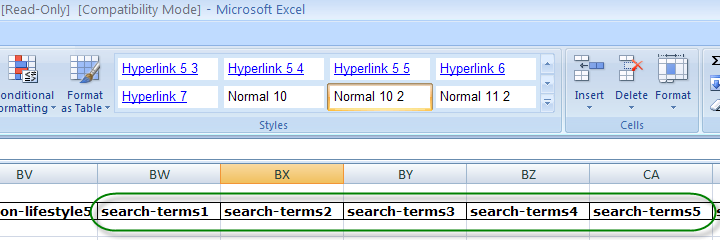
In these workbooks, if you go to the sheet called “Apparel Template” (or similar) and scroll across to the right until you get to columns BW to CA (or about there, depends on the template being used). Here we’ll see “search-terms1” through to “search-terms5”, just like below:
Why Are These So Important?
It’s these keywords that can help your products be found on Amazon, but they shouldn’t be filled with any old junk. Unlike eBay that has quite a complex search engine (which is going to get very smart next year with Cassini, whole different topic) the Amazon sites search engine is still very primitive in comparison.
And it’s because of this, these keywords can make all the difference in making your items found, especially when we consider that the search bar at the top of the Amazon site, takes up a minimum of 44% of the width header area, even the Amazon logo or cart doesn’t get that kind of treatment!

With a search box area that size, we have to be assuming that at least 95% of all sales or more on Amazon are driven by the search this box alone. I think I’ve made the point, search keywords are really important.
What Does Amazon Have to Say About the Search Keywords?
Surprisingly not a lot! Quoting Amazon’s help file for sellers below (which is also worth a good read):
Use terms once
Because the words of the product name are already searchable, do not use search terms that are words also contained in the title. For example, the complete list of automatic search terms for Allison’s Cookies is allison, gourmet, organic, chocolate, chip, pecan, cookie, one & dozen. Good search terms for Allison’s Cookies, therefore, might be “natural,” “baked,” and “dessert.”
Use single wordsSingle words work better as search terms than phrases. If you use phrases, then customers must type each entry exactly as you entered it. For example, if you enter “natural baked dessert” as search terms for Allison’s Cookies, then that is what customers must type. If they type “natural” or “dessert,” your products won’t appear in the search results. However, by listing these terms separately, you allow for more combinations, such as natural, natural dessert, baked desserts, baked, dessert, and baked natural. If you aren’t getting the sales you expect, continue to experiment with your search terms until you find you have the best combination of product title and search terms for your products.
To summarise what Amazon is suggesting we do is to try and keep to broad words and not to repeat them.
That’s pretty straight forwards and good advice. But sometimes broad is not good enough and we need to be specific and this is where the next question/answer comes in.
How Do You use All the Space Provided in the Search Terms?
In each of the search terms fields, 1-5 you’re allowed to enter up to 50 characters and the trick to leveraging these is to use commas between each keyword. That’s 250 characters of search-for-me-find-me goodness.
That way instead of just entering one keyword into each of the 5 search term cell’s, you can now enter multiple keywords in each and because you can use more than just one or two words you can use phrases too.
Now before you go keyword spam-tasticly-crazy with these, it’s really important to take note of Amazon’s first suggestion, use keywords once or kinda taking notice anyway.
Sticking in “ipod,ipod,ipod,ipod,ipod,ipod,ipod,ipod,ipod,ipod” is going to be futile, however stringing keywords together to make mini phrases, well that’s targeted.
Staying with the iPod theme for a few moments and picking on the #1 selling iPod charger, if we look at the title “FreeLogix – White UK 3 Pin Mains Charger – iPod All Generations” and the keywords that are being used:
- ipod charger,
- ipod mains charger,
- ipod nano charger,
- ipod charger,
- ipod 3pin uk charger,
- Portable Audio,
- Portable Audio
While the last two are duplicates, the rest are phrases. In fact the last two are absolutely pointless, who the hell searches for “Portable Audio”?
With thanks to Wikipedia the versions of the iPod are as follows:
- Classic
- Mini
- Nano
- Shuffle
- Touch
I’ve got a Shuffle (fab little thing, doesn’t play Podcasts though…) and the socket won’t fit the shuffle, I’m not sure the others, but for the sake of example we’ll assume they’re all the same.
To make this #1 performing SKU even better, we would bulk these keywords out to include:
- ipod classic charger
- ipod mini charger
- ipod touch charger
Plus seeing as we have 250 characters to use up, we’d also be wanting to play with some other keywords too. Such as:
- ipod uk charger
- ipod 3 pin mains charger
- ipod 3 pin uk charger
- ipod wall charger
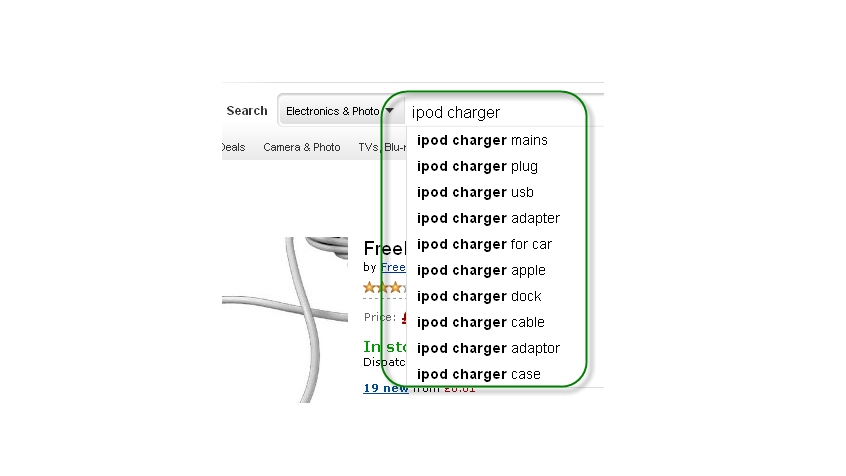
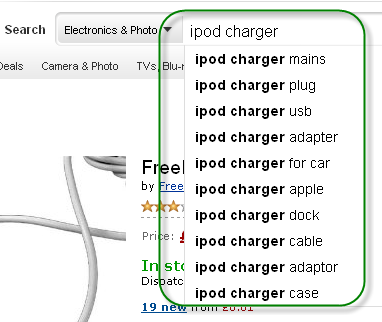 And then if you get bored or stuck with a keyword, we have the best tool available… It’s call predictive search.
Nipping over to Amazon and typing in “iPod Charger” and then pressing space, we are then given predictive keywords that users will search for
See where I’m going with this?
Yep, you’re right, it’s keyword data!
In this example, most of the keywords are not really useful, however these are:
- ipod charger plug
- ipod charger mains
Very quickly, we can get to our ideal limit of using all 250 characters in the search term boxes. And while yes there will be duplicates, they’re going to match what Amazon are presenting to buyers via that whopping great big search box.
So our final keywords to enter into the search terms fields 1-5 will look something like this:
Search Term 1
ipod charger,ipod classic charger,ipod mini charger
Search Term 2
ipod mains charger,ipod touch charger
Search Term 3
ipod nano charger,ipod uk charger
Search Term 4
ipod charger mains,ipod wall charger
Search Term 5
ipod 3pin uk charger,ipod 3 pin uk charger
Obviously you’d spend a little more time than what I have to do further research, but you get the idea, we can use the same keywords that are used in the title, but supplement them with phrases, not keywords in the search term boxes.
In Summary
We’re given 5 search term fields for enhancing the listing search visibility instead of stuffing these with mindless keywords or just single keywords, use phrases. Use what Amazon suggests in their own search box and copy those to your keywords.
We can use comma’s in search terms to enter more than just one term per search field and that means we can bulk these out to cover the common phrases that allow our items to be found. We’re given 250 extra characters, let’s make sure we use them all :)
Have you used this before and found that it works for you too, or didn’t know that you could use a comma and add even more keywords to the search terms fields? Let me know in the comments box below.



Greeting Matt,
I have question.
My keywords is ‘magnetic phone mount’, ‘magnetic car mount’, ‘magnetic phone holder’, ‘magnetic car holder’, so my search terms will be as below:
magnetic phone mount,magnetic car mount,magnetic phone holder,magnetic car holder
Or should i say instead:
magnetic phone car mount holder
which one is better, i have tried many many methods, but no big increase of my exposure,i don’t know why.
Hason
Hi Matt,
You said that you can get the kewords back!? What do you mean by that?
To pick up the thought from CJ, can anyone see what keywords you use? And if so, how do you do this using the API?
Thorben
Hi Thorben,
It was quite some time ago since I wrote this post, I would have either used the source code from the item being used or the Amazon Product Advertising API here https://affiliate-program.amazon.co.uk/gp/advertising/api/detail/main.html As for code samples, you’ll need to check their examples.
Matt
Hi Matt, thanks for this great article in advance. I just started selling on Amazon about a few days go and I implemented your strategy (both space after comma and no space after comma between key words). To test if it works, I’ve chosen a three unique keywords and just wondering how long does it usually take Amazon server to propagate the updates on my listing and start reflecting search terms. I’ve finished tailoring my search terms yesterday and I still can’t find my listing on Amazon search result with unique keywords I put into my listings.
Thank you :)
Joseph
Howdy Joseph,
Quite a while is the answer to answer that, as it’s just not one server but loads to be updated.
Matt
Hi Matt,
Really good article ,thanks !
I tried it ,and it works . While I realized other problems .
I tried three types of cellphone .And I change their titles and set different terms in “the search terms ” .And using different keywords in the titles and “the search terms ” . But we I search keywords . I still can’t find my listing . I don’t know why . Did I miss some important steps ? Whether the title should be as long as enough ?
For example ,when I search the “Rugged mobile phone ” -I have put this in my “search terms “or in my titles . But the listing I can search is the Rugged case or the listings is just the same as us .However , I can’t search my rugged phone .
What a strange !
Julie
Hi Julie,
So the daft question is, is your item actually live on Amazon?
If it is and you’re searching Amazon then it will be there in the results, just not on the first page if you can’t see it.
Amazon weights their searches kind of like eBay does, with a heavy focus on older listings that have a proven track record. So basically if you want to rank higher, the product needs more sales and other things like more ratings to help conversion.
Hope that helps!
Matt
I had a play about with this last night & can see the benefits as well. It is quite easy to play about with the words in seller central & then search against them on Amazon to see your results & how this works.
Prob best concentrating on your own branded items where you have your own listing that only you sell on to get them working well before sorting out keywords on items that are shared with other sellers.
I know I am late joining the party but this article is fantastic and I am so glad I found it! I have just started to sell on Amazon and haven’t loaded up all my products as yet but got really confused over the recent changes. I have had a few sales even though I have a handful of products so things look promising! I am not using an inventory to upload my products – I simply use the “add new product” function and trust this is acceptable. Thanks to your article the keyword issue is all making a bit more sense however I have one question – it says in Amazon Seller Central bumff that you should not repeat the words in the title. For example, if I have a listing “Yellow Leather Handbag” – should I not mention these words in the keywords. That doesn’t make sense to me as I know that women will search on phrases like “leather handbag”, “leather shoulderbag, “leather bag”, “yellow bag”, yellow leather tote etc etc. A buyer will not simply write “bag” or “leather” into the search box – as Amazon is suggesting we use single words only? If you could answer this question then I think I am home and dry!
Beckie
Howdy Beckie,
Just replied to your email too :)
That’s right Amazon do say not to re-use the words from the title, the article above you’re 100% guaranteed to repeat one or more of them with the search phrases. It’s what I’ve found to work well.
Matt
Matt did you find an answer on GK’s post above? Is it worth me editing all my search keywords?
Hi Mark,
I haven’t had chance to come back and revisit this properly yet. However if this does help you, even GK makes a good point on how Amazon suggests to actually use the keywords.
I personally find the method in the article works well and I follow the results, however I’m always up for changing that if GK’s method works!
So…. how about this for a constructive reply, try one set of products one way and another set of products another and see which ones perform better?
Matt
Hi did you work this one out, i have been struggling with this as well?
You might be mistaken. Amazon says not to use commas and not to repeat words. You say use spaces after phrases and repeat words which are part of phrases.
Specifically they say “When entering several words as a search term entry, you don’t need to use punctuation – our system ignores commas.”
So if there are no commas, then there are no phrases either.
Also they say “When entering several words as a search term, put them in the most logical order” which would seem to mean that each of the five lines (of 50 chars each) is actually seen as a phrase.
I cannot guarantee any of this, i am just reading the amazon seller support page. If I understand all this correctly it would mean that
-a b c d
-e f g h
would give me results for “a b c d” but not for “b c a d”
it would also give me results for “c” or “g” alone…though probably not very high.
you say this would work “ipod charger,ipod classic charger,ipod mini charger”
but according to them, the commas dont matter, and the repeated words dont either.
so in reality it would only be seeing “ipod charger classic mini” which doesnt seem like
a ver good phrase.
I might be wrong…this is just what i understand from their page.
any reason to assume what they are saying is not correct?
-gk
Yep actually this seems to have worked now. Thanks for the advice Matt.
Howdy Andrew,
YAY! I’m glad it’s working for you now.
Matt
@ Andrew You mention it works, what exactly worked for you? Did both with and without a space after the comma work ok?
Thanks
Hi Matt. I tried this and it didn’t work – both with and without a space after the comma. The word I entered was a very obscure word (with no other matches on amazon) and it did not show up in the search results after I had uploaded the inventory.
Hi Matt, really good article thanks for this.
Although I am a little dubious about the whole using the comma thing in the search boxes and being able to use more keywords and phrases – has it been officially confirmed by amazon that you can do this? The last thing I want to do is use this technique only to find none of the search terms come up! Also, if you do use it, does it matter if you put a space after the comma or not? E.g for ipad would you do:
ipad,ipad mini,ipad2 etc
or
ipad, ipad mini, ipad 2
? Does the spacing after the comma make a difference?
Thanks again anyway,
Andy
Hi Andy,
Try it. Pick one product and put a unique word in it and load it to Amazon. That will give you the answer you’re looking for.
Matt
How do you know what keywords the iPod charger seller is using? I didn’t realise these were visible to outsiders?
Hola CJ,
For the example above I just used the meta tags on that products page, however you can get the keywords back (although Amazon do amend them) as part of the Amazon Product Advertising API, see here http://docs.amazonwebservices.com/AWSECommerceService/2011-08-01/DG/CHAP_response_elements.html#Keywords
Matt
OK you kind of lost me at the API bit… but basically anyone can see what keywords you are using? I was wondering if people perhaps use ones they shouldn’t and how Amazon would find out/deal with this?
Hi Matt,
Found this really useful. We’ve got ~600 Amazon listings and it looks like most of them don’t have these fields filled in. Going to be a busy weekend!
Keep up the great work!
Dan
Howdy Dan,
It’s well worth the effort, do let us know how you get on and the response from updating/adding them over the next few weeks.
Matt
As we only sold from Amazon I spent months at the start of last year researching this and the buy box to try find out as much info as possible to help us and with enough time, digging around, patience and testing you can get some really good data
I can also add that the more specific the phrase the higher up the rankings you will be, however you run the risk of a customer not searching that phrase so it is always a balancing act between ‘best match specific’ and broad terms that will be found because unlike the title the search terms won’t pick out certain words in the phrases
For example:
you are selling a black and decker power drill so those words are in the title – if you put the phrase “dewalt power drill” as one of your search terms you would have to be found on that exact search the word “dewalt” wouldn’t be searchable unlike black and decker is in the title
Also the order of the words use you changes things so ipod uk charger will pull different results to uk ipod charger
Also another nice trick is child variations are searchable even if the product is out of stock so you can use a different tittle for the child products to the parent – or you can re-arrange the order so they will search differently
Finally another bit I have found with regards to the predictive search is it takes between 30-50 searches for that keyword to appear there so if there are only a few common searches before you get more obscure ones you can see how popular that product or product group is and it helps you focus which inventory to stock or focus on – you can see which lines / colours people want more than others etc
Danny
Hey Matt
Just thought i’d add my own experience in here. These keywords do work dynamite, the fashion company I used to work for when we sent a batch of items to Amazon as part of Red Carpet Scheme the file from eBay they scraped didn’t have these search terms filled in.
Products added manually I did fill the search terms in, and like you suggest I used phrases that would commonly be searched for in the Amazon search box, thanks to the predictive search. These new products were easily outselling the original 400 or so that were uploaded in the beginning.
It was only when I went into them in Seller Central and noticed the search terms were missing that I went through added them and low and behold the sales started creeping in.
You can have the best listing in the world, but if people can’t find it, then you’re never going to see the sales you could be doing.
Great post
Howdy Dave,
Thanks for confirming! They take a lot of work to get them in, but once they’re in they make a huge difference.
“You can have the best listing in the world, but if people can’t find it, then you’re never going to see the sales you could be doing.”
I think we need to do that Podcast on “Titles that Sell”!
Matt
Thanks Matt.
Is it , and space between words or is just a comma sufficient?
What about plurals? iPod uk charger or iPod uk chargers?
Morning Rik,
If that is what the search results in the predictive text is showing you to use, then use it. I’d go for non plural first, but if you have the space, include a plural version.
A good example is go to Amazon and type in “blackberry phone” and watch the predictive searches, in this case if you were selling a case, then you should choose “blackberry phone cases” over “blackberry phone case”.
Matt